
Welke capture card kopen in 2026?
Stream je vanaf een console naar een tweede pc: de Elgato Game Capture 4K S (± €155, Megekko, 26 september 2026) capteert tot 2160p60 met HDR en is de beste prijs-kwaliteit. Speel je zelf op hoge refresh rate en wil je dat ook doorgeven: de 4K X (± €229) haalt 2160p144 op capture én passthrough. Bouw je een vaste dual-pc-opstelling en heb je een vrij PCIe-slot: de Elgato 4K Pro of de AVerMedia GC575 (voorheen 'Live Gamer 4K 2.1') gaan tot 8K-passthrough. Vermijd de Razer Ripsaw HD — die is nauwelijks nog te vinden bij Belgische en Nederlandse winkels.
- Sweet-spot: Elgato 4K S2160p60-capture, HDR-passthrough, ± €155 (Megekko, 26/9/2026).
- Voor hoge refresh: Elgato 4K X2160p144 capture én passthrough via 10 Gbps USB, ± €229.
- Ripsaw HD is lastig te vindenNiet bij Megekko/Alternate.nl op 26/9/2026 — kijk naar de Elgato Neo.
- PCIe-optie: AVerMedia GC575Zelfde kaart als de "Live Gamer 4K 2.1", nu onder modelnummer verkocht.
Top capture cards
Onze snelle aanbevelingen per categorie — scroll verder voor full reviews.

Razer Ripsaw HD
Eenvoudige capturekaart — 1080p60 met 4K60-passthrough.

Elgato HD60 X
Instap-standaard — 1080p60 HDR capture met 4K60-passthrough.
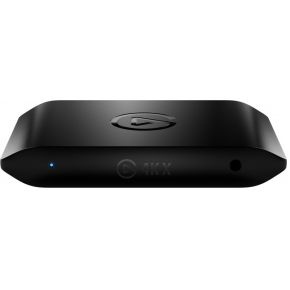
Elgato 4K X
Externe capturekaart tot 4K144 met 4K144-passthrough.
AVerMedia Live Gamer 4K 2.1
Interne PCIe-kaart met 4K60 HDR capture en 4K144-passthrough.
We verdienen commissie via bovenstaande links. Dit beïnvloedt onze rangschikking niet.
Capture versus passthrough: de cijfers naast elkaar
Fabrikanten zetten graag het grootste getal op de doos, maar dat is bijna altijd de passthrough-resolutie — wat jíj ziet terwijl je speelt — niet de capture-resolutie die je publiek of opname krijgt. Onderstaande tabel komt rechtstreeks uit de technische specificaties van elke fabrikant (26 september 2026):
| Capture card | Max. capture | Max. passthrough | Interface | Winkel |
|---|---|---|---|---|
| Elgato Game Capture Neo | 1080p60 | 2160p60 HDR | USB-C extern | Elgato.com |
| Elgato Game Capture 4K S | 2160p60 HDR | 2160p60 / 1440p144 / 1080p240 HDR+VRR | USB-C extern | Megekko |
| Elgato Game Capture 4K X | 2160p144 HDR | 2160p144 HDR+VRR | USB 10 Gbps extern | Megekko → |
| Elgato Game Capture 4K Pro | 2160p60 / 1440p144 / 1080p240 HDR | 4320p60 (8K) / 2160p240 HDR+VRR+ALLM | PCIe 2.0 x4 intern | Megekko → |
| AVerMedia GC571 (budget PCIe) | 2160p30 | 2160p60 / 1440p144 / 1080p240 HDR+VRR | PCIe Gen3 x1 | Megekko |
| AVerMedia GC575 ("Live Gamer 4K 2.1") | 2160p144 | 2160p144 HDR+VRR | PCIe Gen3 x4 | Megekko |
| Razer Ripsaw HD | 1080p60 | 2160p60 | USB 3.0 extern | Niet bij Megekko/Alternate.nl |
Twee dingen vallen op. Eén: de Elgato 4K S en de AVerMedia GC575 hebben bijna identieke passthrough-cijfers, maar de GC575 haalt dat ook op capture (2160p144 tegenover 2160p60 bij de 4K S) — voor wie zelf op hoge refresh rate speelt én dat wil opnemen, is de AVerMedia dus sterker dan zijn prijsklasse doet vermoeden. Twee: de Razer Ripsaw HD is technisch nog steeds een geldige budget-kaart, maar staat op 26 september 2026 bij geen van beide Nederlandse/Belgische winkels in de catalogus — voor een vergelijkbaar budget is de Elgato Neo het praktischere alternatief.
Winnaars per use-case
Instap: Elgato Game Capture Neo — $119,99
Elgato's eigen specificaties noemen 1080p60-capture met 4K60 HDR-passthrough. Plug-and-play zonder poespas — de instapkeuze voor wie net begint met console-streamen.
Sweet-spot: Elgato Game Capture 4K S — ± €155
2160p60 HDR-capture, HDMI 2.0 in/uit, USB-C. Voor de meeste streamers de beste balans tussen prijs en kwaliteit.
Hoge refresh: Elgato Game Capture 4K X — ± €229
Capteert én geeft door tot 2160p144 met HDR en VRR via een 10 Gbps USB-verbinding. Voor wie zelf op een 144Hz-scherm speelt en dat niet wil inleveren tijdens het streamen.
PCIe-optie: Elgato Game Capture 4K Pro — ± €270
Interne PCIe-kaart met passthrough tot 4320p60 (8K) en 2160p240, inclusief ALLM. Vereist een vrij PCIe-slot en moederbord-ondersteuning, maar is de enige kaart in deze gids die 8K-schermen aankan.
PCIe-budget: AVerMedia GC571 — ± €145
AVerMedia's Live Streamer Ultra HD capteert tot 2160p30 met 2160p60 HDR/VRR-passthrough via een PCIe Gen 3 x1-slot. Een goedkoop alternatief voor wie liever geen USB-kastje op het bureau heeft.
Waar let je op bij het kiezen van een capture card?
- Passthrough-kwaliteit: bepaalt hoe jíj speelt. Wil je op 4K 120Hz+ gamen terwijl je streamt, dan moet de passthrough dat aankunnen — een kaart met alleen 4K60-passthrough dwingt je console of pc omlaag.
- Capture-resolutie en HDR: bepaalt wat je publiek ziet. Voor Twitch volstaat 1080p60; voor YouTube-VOD's in native kwaliteit wil je 2160p60 met HDR10.
- Aansluiting en bandbreedte: een 4K-kaart wil minimaal USB 3.2 Gen 2 of een vrij PCIe-slot. Op een tragere poort valt de capture terug naar een lagere resolutie of hapert het beeld.
- UVC-ondersteuning: kaarten die als standaard webcam-apparaat werken, hebben geen drivers nodig en werken direct in OBS, Discord en Teams.
Bouw je een volledig streaming-station? Bekijk dan ook onze webcam-gids en de complete Twitch setup-gids.
Veelgemaakte fouten bij aankoop
- Een capture card kopen voor een single-pc setup. Stream je pc-games vanaf dezelfde machine, dan doet OBS dat gratis via Game Capture — een capture card voegt daar niets aan toe.
- HDCP over het hoofd zien. Consoles versleutelen hun HDMI-signaal standaard; bij de PS5 zet je dat uit in de systeeminstellingen, anders blijft je preview zwart.
- Passthrough en capture verwarren. Het grote getal op de doos gaat vaak over passthrough. Check altijd welke resolutie de kaart daadwerkelijk opneemt.
- Besparen op de HDMI-kabel. 4K120-passthrough vraagt een Ultra High Speed-gecertificeerde kabel; een oude kabel geeft signaalverlies of zwarte flikkeringen.
Setup-gids: PS5 naar Twitch
- Verbind PS5 → capture card (HDMI-in)
- Capture card (HDMI-uit) → tv of monitor (voor passthrough)
- USB of PCIe van de capture card → streaming-pc
- OBS Studio → Bronnen → Video Capture Device → selecteer de capture card
- Audio toevoegen: headset-microfoon en desktop-audio (game-geluid)
- Stream key uit het Twitch-dashboard → Instellingen → Stream → Service: Twitch
- Output-instellingen: 1080p60, NVENC-encoder als je een RTX-kaart hebt, rond 6000 kbps bitrate
Niet kopen als…
- Je enkel je eigen pc-games streamt. OBS doet dat gratis via Game Capture; een aparte kaart is dan weggegooid geld.
- Je geen tweede pc hebt. Een capture card heeft pas nut in een dual-pc-opstelling of om een console/camera te capteren.
- Je budget krap is en je de Ripsaw HD op het oog had. Die is nauwelijks nog te vinden bij Belgische/Nederlandse winkels; de Elgato Neo zit in dezelfde prijsklasse en is wél verkrijgbaar.
Veelgestelde vragen
Veelgestelde vragen
Heb ik een capture card nodig?
Elgato 4K S, 4K X of 4K Pro: wat is het verschil?
Is de AVerMedia Live Gamer 4K 2.1 nog te koop?
Is de Razer Ripsaw HD nog verkrijgbaar in België of Nederland?
Intern PCIe of extern USB?
Waarom zie ik geen beeld van mijn PS5 in OBS?
Belast een capture card mijn CPU zwaar?
Werkt een capture card met de Nintendo Switch 2?
Bronnen
- Elgato — Game Capture 4K Pro technische specificaties
- Elgato — Game Capture 4K S technische specificaties
- Elgato — Game Capture Neo technische specificaties
- Elgato — verschil 4K X vs 4K Pro
- AVerMedia — Live Gamer 4K 2.1 (GC575) specificaties
- AVerMedia — Live Streamer Ultra HD (GC571) specificaties
- Razer Newsroom — Ripsaw HD specificaties
- PowerPyx — PS5 HDCP-fix voor capture cards
- NVIDIA — broadcasting-gids over NVENC
Complete streaming-setup?
Bekijk onze gids voor microfoons en webcams voor streamers.
Naar de stream-gids